

How RevMax’s Pricing Floor Tool Protects Revenue Without Sacrificing Flexibility
It’s easy to leave revenue on the table. Rates dip a little too low and the bookings roll in, and suddenly your profit margins are looking a little bit thinner.
RevMax’s pricing floor tool was built to prevent this by creating a floor so you’re gaining year-over-year. How much? That’s up to you.
At a high level, it comes down to one goal: Never make less than you already proved you could earn.

Why Pricing Floors Matter
Being able to raise rates feels great, but knowing where and how to set the floor is just as valuable.
Without a defined floor, rates can drop too aggressively during slower periods when it may not be necessary, historical performance context gets completely ignored, and your properties book at the expense of your revenue per available night.
With RevMax, you set clear boundaries so your pricing stays aligned with your business goals.
Three Ways to Control Your Pricing Floors (and Ceilings)
RevMax gives you flexibility in how you apply pricing constraints. Whether you want a consistent baseline or dynamic adjustment, you can choose how strict or flexible your strategy should be.
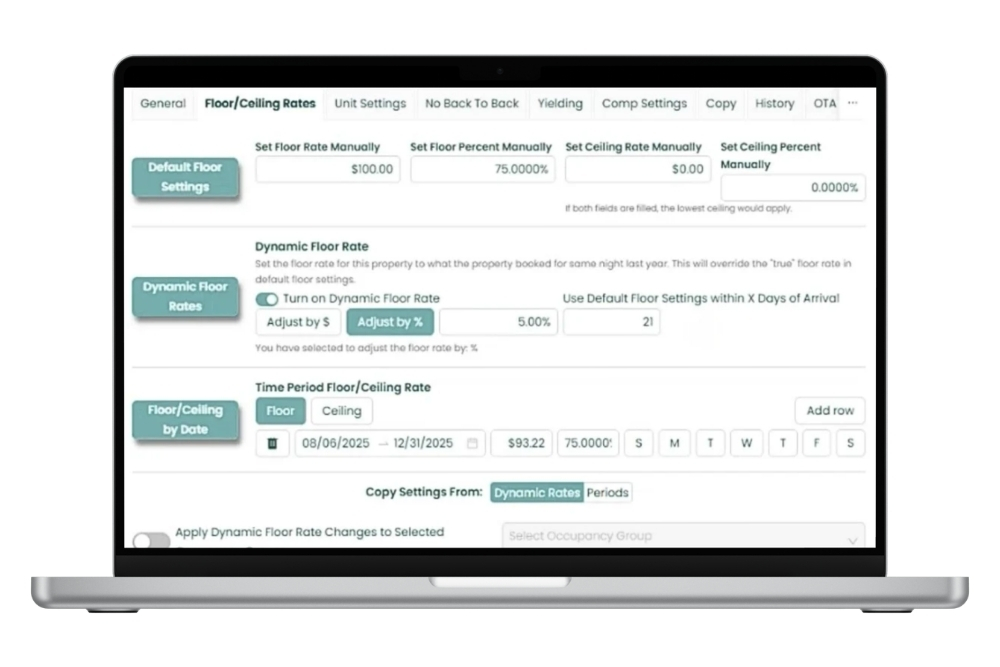
1. Default Floor Settings
Set your baseline and keep your strategy consistent.
Default Floor Settings let you define the core pricing rules for a property. These act as your foundation and apply across your standard pricing setup.
You can customize:
- Floor Rate – The lowest rate a property can be priced at
- Floor Percent – A percentage-based minimum relative to your pricing model
- Ceiling Rate – The maximum allowed rate
- Ceiling Percent – A percentage-based cap to prevent overpricing
This is your “always-on” protection layer. It’s simple, reliable, and easy to manage at scale.
2. Dynamic Floor Rate
Use historical performance to guide today’s pricing.
Dynamic Floor Rates take things a step further by anchoring your minimum price to real demand.
With this setting, RevMax can:
- Set your floor based on what that unit booked for on a similar night last year
- Override your standard floor when historical data suggests a higher baseline
From there, you can fine-tune the behavior:
- Increase or decrease by a fixed dollar amount
- Adjust by a percentage
- Fall back to your default floor rate during selected arrival dates to avoid gaps in occupancy
This approach gives you confidence that you’re not undercutting proven performance while still adapting to current conditions.
3. Floor and Ceiling by Date
Apply pricing strategy where it matters most.
Date-based controls can prevent your Friday night from being priced like Tuesday.
With Floor and Ceiling by Date, you can:
- Set specific pricing boundaries for date ranges
- Adjust by day of the week (weekends vs. weekdays)
- Tailor pricing rules for high-demand periods, events, or shoulder seasons
You can also choose how any of these three rules apply:
- Limit them to specific occupancy groups
- Apply them to dynamic floor rates for selected units
This level of control helps you protect peak revenue while staying competitive during softer windows.
Control Without Complication
Making your pricing strategy overly restrictive isn’t the goal. You can have peace of mind along with a stronger strategy with price floor and ceiling logic.
You can:
- Lock in proven performance
- Prevent unnecessary rate drops
- Stay flexible based on demand and timing
The Bottom Line
You’ve already done the work to generate revenue.
This tool ensures you don’t give it back. Protect what you’ve earned with RevMax’s price floors — and keep capturing new opportunities along the way.